
How to track symptoms: where to start
Symptom tracking is the practice of recording your physical or mental health experiences over time, so you can spot patterns, communicate clearly with your doctor, and make more informed decisions about your care. The good news: you don't need a medical degree or a fancy app to begin. A notebook and a consistent daily habit will get you further than most people expect.
The most effective starting point is to pick just one or two symptoms that concern you most. Trying to log everything at once leads to burnout fast, and an abandoned tracker helps no one. Once you've chosen your priorities, decide on your method: a paper notebook, a notes app on your phone, or a dedicated health app. Then set a recording frequency, whether once daily, after meals, or at symptom onset, and stick to it.
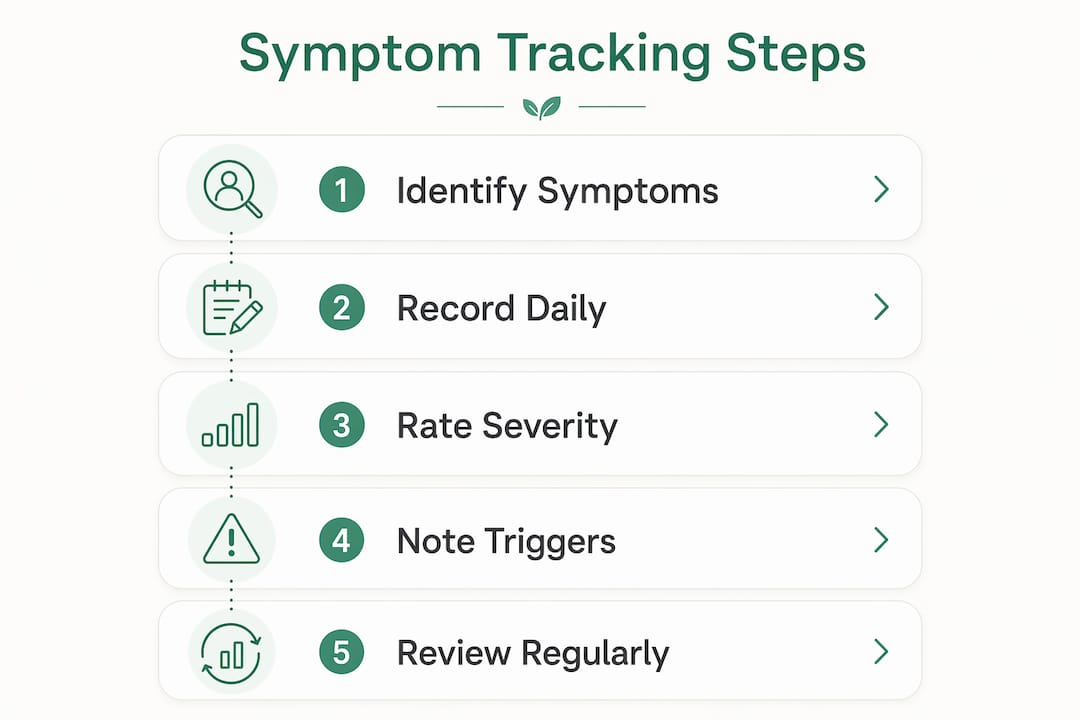
Here's what every new tracker should log from day one:
- Date and time of each symptom occurrence
- What the symptom feels like (sharp, dull, throbbing, constant, intermittent)
- Severity on a simple scale (1–10 or mild/moderate/severe)
- How long it lasted
- What you were doing when it started
Starting small is the point. You can always add more detail later once the habit is locked in.

What is a symptom journal and why does it help?
A symptom journal is a running record of your daily health experiences, kept consistently over days, weeks, or months. Think of it less like a medical chart and more like a personal log that builds a picture of your health over time. That picture is something neither you nor your doctor can get from a single office visit.
The benefits go well beyond having something to show your provider. Keeping a journal helps you:
- Identify triggers — foods, stress, sleep, weather, or activities that precede flare-ups
- Track treatment effectiveness — whether a new medication or lifestyle change is actually working
- Improve provider communication — giving your doctor specific, dated information instead of vague recollections
- Spot trends — gradual worsening or improvement that's invisible day to day
- Feel more in control — turning a confusing health experience into something concrete and manageable
That last point matters more than people realize. Chronic illness and unexplained symptoms can feel overwhelming. Writing things down shifts you from passive sufferer to active observer, and that psychological shift has real value. Journals also adapt easily to personal needs: some people track mental health symptoms like anxiety or mood, others focus on physical pain, fatigue, or digestive issues. The format follows the person, not the other way around.
Practical tips for keeping an effective symptom tracker
Consistency beats perfection. Missing a day doesn't mean your tracker is ruined; it means you're human. The goal is a record that's useful over weeks and months, not a flawless daily log.
A few habits that make tracking sustainable:
- Set a specific time to record each day, such as right after dinner or before bed, so it becomes automatic
- Use plain language rather than medical terms; "stabbing pain behind my left eye" is more useful than "cephalgia"
- Keep entries brief — two to three sentences per symptom is enough for most days
- Rate severity every time, even when symptoms feel the same, because subtle changes show up in the data later
- Don't skip context — note what you ate, how you slept, or whether you were stressed, since these details reveal triggers
Pro Tip: Limit yourself to tracking no more than two symptoms when you start. Tracking fatigue is a real and common reason people quit, and a focused log is far more valuable than an exhaustive one you abandon after two weeks.
One thing that trips people up: turning tracking into its own source of anxiety. If reviewing your log every night makes you feel worse, scale back. Check it weekly instead. The tracker works for you, not the other way around. Sustainable tracking that balances data detail with emotional well-being produces better long-term results than obsessive daily analysis.

What to include in a symptom journal or app
The more specific your entries, the more useful your data. Vague notes like "felt bad today" tell you almost nothing when you look back in three months. These are the data points worth capturing:
- Date and time — exact, not approximate
- Symptom description — location on the body, quality (burning, pressure, tingling), and whether it's constant or comes in waves
- Severity rating — use the same scale every time (more on this in the next section)
- Duration — how long the episode lasted, from onset to resolution
- Possible triggers — recent meals, activities, stress levels, sleep quality, environmental factors
- Relief factors — what made it better, including rest, medication, heat, or position changes
- Impact on daily life — did it stop you from working, exercising, or sleeping?
- Medications taken — name, dose, and timing, plus whether they helped
- Photos — for visible symptoms like rashes or swelling, photographing under consistent lighting captures detail that words miss
That last item is underused. A photo taken in the same lighting at the same time of day creates a visual timeline that's genuinely hard to replicate with written descriptions alone. Dermatology and wound care providers in particular find photographic records far more useful than verbal accounts.
How to rate symptoms on a severity scale
Rating scales turn subjective experience into data you can actually compare across days and weeks. Without them, "bad headache on Tuesday" and "bad headache on Friday" are indistinguishable, even if one was a 4 and the other was an 8.
The two most common approaches:
- Numeric scale (1–10): 1 is barely noticeable, 10 is the worst imaginable. Simple, fast, and universally understood by healthcare providers.
- Categorical scale (mild/moderate/severe): Useful when numbers feel arbitrary or when tracking symptoms that don't map neatly to intensity, like nausea or brain fog.
A few practices that keep ratings consistent and meaningful:
- Anchor your scale — decide once what a "5" or "moderate" means for your specific symptom, and use that definition every time
- Rate at the moment, not hours later, since memory tends to compress or exaggerate intensity
- Avoid defaulting to extremes — reserving 10 for genuinely incapacitating episodes keeps the scale useful
- Track at the same time of day when possible, since many symptoms follow circadian patterns that skew ratings if you log at random times
Over time, a consistent severity rating reveals whether your condition is stable, improving, or worsening, which is exactly the kind of objective signal your doctor needs to adjust treatment.
How to use your symptom tracking data
Collecting data is only half the job. The other half is actually looking at it. Most people log faithfully for weeks and then never review what they've recorded, which wastes the effort entirely.
Here's how to put your records to work:
- Review weekly — scan for patterns: Does the symptom spike on certain days? After specific foods? During high-stress periods?
- Prepare a summary before appointments — pull out the three to five most notable entries and any clear trends; your doctor has limited time, and a one-page summary is far more useful than handing over a raw journal
- Use the data to test hypotheses — if you suspect gluten triggers your headaches, your log will either confirm or challenge that over a few weeks
- Track treatment response — note when you started a new medication or changed a habit, then look at severity ratings before and after
- Share records securely — many apps export data as PDFs or spreadsheets; paper journals can be photographed or summarized in a brief written note
Regularly reviewing symptom records improves communication with healthcare providers and supports more tailored care decisions. One caution: resist the urge to self-diagnose based on patterns you notice. Your job is to observe and report accurately. Interpretation is your provider's job, and your data gives them much better material to work with.
What are the best apps for symptom tracking?
Digital tools have made symptom logging faster and more useful than paper alone, though paper still works well for people who prefer it. The right choice depends on your symptoms, your tech comfort level, and how much detail you want to capture.
Paper notebooks and journals remain a solid option. They're private by default, require no battery, and suit people who think better when writing by hand. A simple ruled notebook with a consistent daily format is all you need.
General notes apps like Apple Notes or Google Keep work for basic logging, especially if you already use them daily. They lack reminders and reporting features but are frictionless to start.
Specialized symptom tracking apps offer the most functionality. The Bearable Symptom Tracker app is one of the most well-regarded options available in the US. It lets you log mood, pain levels, medications, energy, and custom symptoms you define yourself. Bearable generates visual reports and trend charts, sends reminders, and lets you export data to share with providers. The customization is a genuine strength: you're not forced into preset symptom categories that may not match your condition.
Other specialized apps vary widely in focus. Some are built for specific conditions like migraine, diabetes, or mental health. Others take a broader approach similar to Bearable. When evaluating any app, look for:
- Customizable symptom categories so you're not limited to preset options
- Reminder features to prompt logging at consistent times
- Export or sharing options for provider appointments
- Data visualization that shows trends over time, not just raw entries
For people managing hormonal or menstrual symptoms, cycle-specific tracking tools add another layer of context that general apps often miss.
Digital tools may provide superior pattern recognition and automated reports for chronic conditions compared to paper methods, particularly when symptoms are complex or involve multiple variables. That said, the best tool is the one you'll actually use consistently.
Privacy and data security when tracking symptoms
Health data is among the most sensitive personal information you can store digitally, and not all apps treat it with the same care. Before you commit to any app, it's worth understanding what happens to your data.
A few questions to ask before downloading any symptom tracking app:
- Is the app HIPAA-compliant? Apps that qualify as covered entities or business associates under HIPAA must meet federal privacy standards, but many consumer wellness apps do not fall under HIPAA at all.
- Does the app sell or share your data? Read the privacy policy, specifically the sections on third-party data sharing and advertising.
- Where is your data stored? Cloud-based apps store data on remote servers; understand whether that data is encrypted in transit and at rest.
- Can you delete your data? A reputable app gives you full control to export and permanently delete your records.
Paper journals carry their own privacy considerations: physical security, who has access to your home, and what happens to the journal if it's lost. For digital records, password-protecting your device and using apps with two-factor authentication adds a meaningful layer of protection.
Peacehealthai is built with secure access as a core design principle, giving people confidence that their health information stays private while still being accessible when they need it.
How often should you record symptoms for accuracy?
Frequency matters more than most people expect. Recording symptoms once a week from memory produces a very different, and less accurate, picture than logging at the time they occur.
The general guidance:
- Log at symptom onset whenever possible, rather than reconstructing the day from memory at bedtime
- Daily recording works well for chronic conditions where symptoms are present most days
- Multiple times per day is appropriate for rapidly changing symptoms, like blood sugar fluctuations, mood episodes, or pain that varies significantly hour to hour
- After-the-fact logging is better than nothing, but memory compresses and distorts intensity, especially for pain
Real-time symptom capture reduces memory bias and improves the accuracy of what gets recorded. This is the core principle behind Ecological Momentary Assessment, a research method that prompts people to log symptoms in the moment rather than retrospectively. The practical takeaway: the closer your log entry is to the actual symptom, the more reliable your data.
For most people managing a chronic condition, a brief daily log at a fixed time, supplemented by immediate notes during acute episodes, strikes the right balance between accuracy and sustainability.
Symptom tracking templates and formats
You don't need to design your own system from scratch. These formats cover most use cases:
Basic daily log (paper or notes app)
| Field | Example entry |
|---|---|
| Date/time | — |
| Symptom | Headache, right temple |
| Severity (1–10) | — |
| Duration | — |
| Possible trigger | Skipped lunch, poor sleep |
| Relief | Ibuprofen, dose and time recorded |
Weekly summary table — useful for provider appointments
| Day | Main symptom | Peak severity | Trigger noted | Medication used |
|---|---|---|---|---|
| Monday | Fatigue | — | Poor sleep | None |
| Wednesday | Joint pain | 5 | Cold weather | Naproxen |
| Friday | Headache | 4 | Stress | Ibuprofen |
Mood and mental health log — add columns for sleep hours, anxiety level, and any notable events or stressors.
Condition-specific formats — apps like Bearable let you build custom templates around your specific symptoms, which is more useful than a generic format for complex or multi-symptom conditions.
The format matters less than the consistency. Pick one that takes under five minutes to complete, and you'll actually keep it up.
How real-time and personalized tracking are changing symptom monitoring
The most significant shift in symptom tracking over the past several years is the move from retrospective recall to real-time capture. Traditional diary methods ask people to remember and reconstruct their symptoms, often hours after the fact. Ecological Momentary Assessment (EMA) flips that model: it prompts people to record symptoms in the moment, which reduces memory distortion and surfaces correlations with lifestyle factors that retrospective logs miss entirely.
EMA and related real-time methods offer several advantages over traditional approaches:
- Reduced recall bias — logging in the moment captures intensity and context that memory alters
- Higher data density — multiple daily prompts build a richer picture of symptom variability
- Better correlation detection — real-time data reveals links between symptoms and triggers like sleep, activity, or stress that daily summaries obscure
- Adaptive prompting — simplified interfaces and flexible schedules improve adherence without overwhelming people
Personalization is the other major development. Symptom sets tailored to an individual's specific condition increase engagement and produce more clinically relevant data than generic tracking categories. Research in conditions like endometriosis shows that patient-tailored symptom tracking better captures disease variability and burden than standard questionnaires.
Peacehealthai brings both of these principles together. Its AI-powered platform enables automated, customized symptom monitoring, generates early alerts when repeated symptoms appear, and provides health score analytics that help people understand their patterns without needing to interpret raw data themselves. The AI symptom checker processes detailed symptom input and returns guidance on next steps, reducing the gap between noticing a symptom and knowing what to do about it.
Try Peacehealthai for smarter symptom tracking
Peacehealthai combines the discipline of structured symptom tracking with AI-powered analysis that most people can't get from a notebook or a basic app. The platform covers symptom history tracking, early alerts for recurring patterns, daily health insights, and goal-based coaching, all within a secure, accessible interface.
Whether you're just starting to log symptoms or you've been tracking for years and want deeper analysis, Peacehealthai gives you a clearer picture of your health without the complexity. You can explore the full feature set at peacehealthai.org/features and run your first symptom check at peacehealthai.org/check.
Key Takeaways
Consistent real-time symptom logging produces more accurate and useful health data than retrospective recall, making it the foundation of effective personal health management.
| Point | Details |
|---|---|
| Start with a small number of symptoms to focus on top priorities and prevent tracking fatigue. | Focusing on top priorities prevents tracking fatigue and builds a sustainable habit. |
| Log at the moment | Recording symptoms when they occur reduces memory bias and improves data accuracy. |
| Use a severity scale | Rating symptoms consistently on a 1–10 or mild/moderate/severe scale reveals trends over time. |
| Review before appointments | Summarizing key entries before provider visits improves communication and supports better care decisions. |
| Choose tools that fit you | Paper, notes apps, or specialized apps like Bearable all work; consistency matters more than the format. |